SQL To CSharp Plus is a Visual Studio extension that automates the generation of C# classes, interfaces, repositories, services, and controllers from SQL Server database tables, views, and stored procedures. It streamlines the creation of robust data access layers and related code, accelerating .NET project development and reducing manual coding effort.
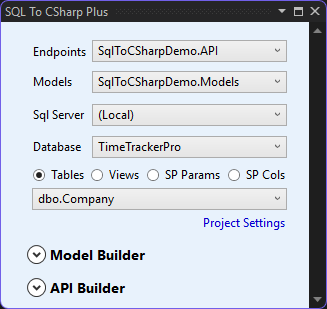
- Visual Studio Integration: Deep integration with Visual Studio, including solution and project event handling, making it seamless for developers to use within their IDE.
- Automated Code Generation: Automatically generates C# classes and methods from SQL tables, views, and stored procedures, reducing manual coding and errors.
- Automatic Interface and Service Generation: Generates not only the API class but also related interfaces and service classes, following best practices for layered architecture.
- Flexible Data Source Selection: Supports switching between tables, views, and stored procedures for property and method generation.
- External Model Support: Allows referencing external DLLs for property models, enabling code reuse and modularity.
- UI-Driven Workflow: Provides a WPF-based user interface for selecting projects, databases, tables, and customizing code generation options.
- Attribute and Validation Support: Optionally adds data annotation attributes like
[Required]and[StringLength]to generated properties for validation. - NuGet Package Management: Detects and installs required NuGet packages (e.g.,
DatabaseLibraryMDS) automatically if missing. - Customizable Settings: Remembers user preferences and settings, and supports custom logging and external property references.
- Customizable Naming and Structure: Lets you define API names, class names, and folder locations for generated files.
- External Model Support: Can reference and use property models from external DLLs for parameter and return types.
- Error Handling and Logging: Optionally includes argument null checks, custom logging, and suppresses info logging based on your settings.
- UI-Driven Configuration: All options are set through a Visual Studio-integrated UI, reducing manual coding and configuration errors.